The clean “no-scope-creep” method to eliminate (not set)
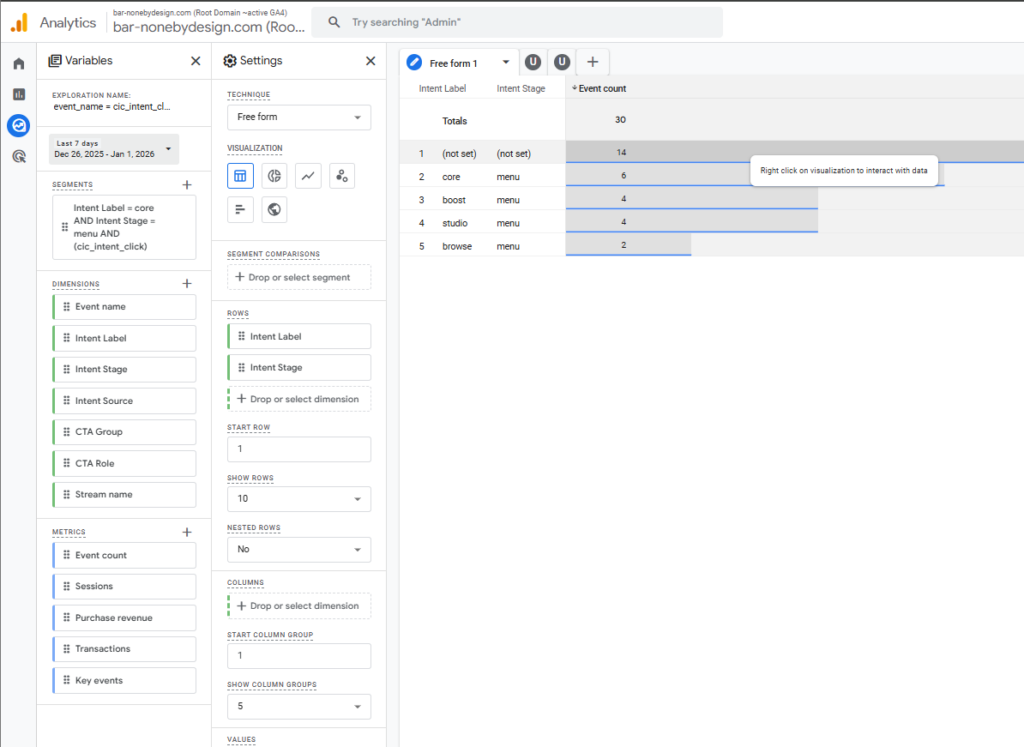
Step 1 — Prove whether the (not set) is just historical
In GA4 Explorations, set the date range to start after your fix went live (ex: “Last 1–2 days” or even “Today”).
- If (not set) drops to ~0 → congratulations, it was mostly legacy data.
- If (not set) is still happening → you’ve got a live leak.
This is the fastest sanity check.
Step 2 — Use GTM Preview as your lie detector (you’re already there)
Yes, we’re looking at each cic_intent_click instance in Preview.
In Tag Assistant Preview:
- In the left event timeline, click each event named
cic_intent_click(you’ll see multiple instances). - In the middle pane, open Tags and click the tag that fired:
“GA4 – Event – cic_intent_click” (or whatever you named it) - Look for the Event Parameters list in the tag details.
You need these to be non-empty every time:
Example:
intent_labelintent_stageintent_source
If even one of those is missing/blank on a firing instance, that instance will become (not set) in GA4.
Shortcut: in your Hit Details view, you’re already seeing them as ep.intent_label, etc. That’s the same truth, just lower-level.
Step 3 — When you find a “bad” instance, figure out why it was blank
There are only a few real causes:
A) The values were never in the dataLayer at click time (timing/order)
Open the Variables tab for that same event moment and check your DLVs (dataLayer variables).
- If your DLVs are empty → your click fired before the push/population happened.
Fix options (pick 1):
- Ensure your script does the
dataLayer.push({intent_label:..., intent_stage:...})before the click triggers the GA4 event. - If your logic calculates values on click, then push them to dataLayer inside the click handler first, then fire the GA4 event tag.
B) The event is being fired by a different tag path (duplicate instrumentation)
This is extremely common.
Example: GTM tag fires cic_intent_click correctly and some older script fires cic_intent_click without params.
How to detect:
- In Preview, when
cic_intent_clickhappens, look at Tags Fired list.
If you see more than one GA4 event tag (or a weird custom HTML tag) tied to that click, you’ve got duplicates.
Fix:
- Kill the old path, or rename it, or block it with trigger conditions.
C) The trigger is too broad (fires on clicks that aren’t your intent buttons)
So some clicks match the trigger, but don’t have the metadata.
Fix (best practice): add a “required fields” gate
In GTM, update the trigger (or add a blocking condition) so the GA4 event tag fires only when required values exist, e.g.:
{{DLV - intent_label}}matches RegEx.+{{DLV - intent_stage}}matches RegEx.+{{DLV - intent_source}}matches RegEx.+
That turns “(not set)” into “tag doesn’t fire when it can’t be trusted.” This is exactly the behavior you want.
Step 4 — Reconcile GA4 “(not set)” rows with what Preview shows
Your Exploration shows a row:
(not set) / (not set)with count 14 (in that view)
That means 14 cic_intent_click hits arrived missing both label and stage.
So your mission is simple:
- Find one
cic_intent_clickin Preview whereep.intent_labelorep.intent_stageis absent/blank. - Whatever caused that one is almost always the same cause for the rest.
Your tight next move (in order)
- Narrow Exploration date to Today / last 24h → is (not set) still happening?
- In GTM Preview, click each
cic_intent_clickinstance → confirm all three params are present every time. - If any are missing → add the required-fields trigger gate so the tag cannot fire unless the values exist.
- Only after that stabilizes: build funnels / attribution.
You’re doing it the right way: instrument → validate → then model. The universe rewards this kind of discipline.