Why cic_intent_click is NOT showing as a Key Event (yet)
This trips up even seasoned GA4 users because Google hides the levers behind timing and semantics.
1. “Key event” ≠ “Event exists”
An event can be:
- firing perfectly,
- visible in Realtime,
- explorable in Explorations,
- flowing into Looker Studio,
and still not appear in the Key events table.
Why? Because GA4 only surfaces events that have occurred after they are marked as key events.
You just promoted the event to first-class citizenship. GA4 hasn’t had time to observe it as a key event yet.
No retroactivity. No forgiveness. Very Google.
2. You are on the correct screen
Admin → Events → Key events is the right place.
What’s missing is post-promotion traffic, not configuration.
Once:
cic_intent_clickfires again- after being toggled as a key event
…it will appear here within minutes to hours (Realtime) and within ~24 hours consistently.
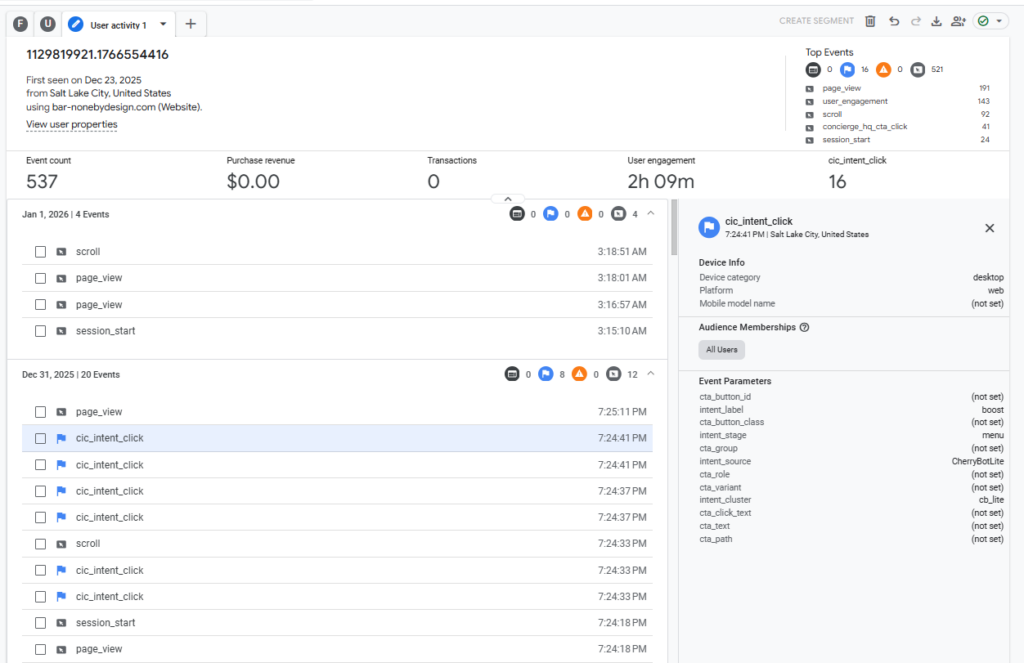
Your Realtime screenshot already confirms:
- event is firing
- parameters are populated
- GA4 config tag is healthy
- GTM container is authoritative
So we do not touch anything here.
Status Check (Hard Truth, Clean Bill of Health)
| Layer | Status |
|---|---|
| GTM authoring | ✅ Correct |
| GA4 sponsorship | ✅ Receiving |
| Event contract | ✅ Locked |
| Parameters | ✅ Registered |
| Explorations | ✅ Valid |
| Looker Studio | ✅ Publishing |
| Key event table | ⏳ Waiting on post-promotion data |
No red flags. No drift. No phantom bugs.
What We Do Next (in strict order)
You already outlined this perfectly. We now execute, not rethink.
Phase 3 — Eliminate (not set) at the source
Do not model funnels until this is done.
Concrete actions:
- Confirm every
cic_intent_clickincludes:intent_labelintent_stageintent_source
- Fix any missing values in GTM / dataLayer, not GA4.
- Use Explorations as your lie detector.
Rule: If Looker shows (not set), GTM failed upstream.
Phase 4 — Declare the Funnel (now that data is clean)
Only after Phase 3 is green:
Canonical intent funnel (example):
page_viewuser_engagementcic_intent_clickconcierge_hq_cta_clickform_startform_submit
This becomes:
- your Funnel Exploration
- your attribution backbone
- your executive narrative
Phase 5 — Attribution logic (lightweight, intentional)
Start simple:
- Event-scoped attribution
- Last non-direct touch
- Role-aware (Core / Studio / Boost)
Do not over-model yet. You’re building a decision system, not a PhD thesis.
Executive takeaway (the one that matters)
You’ve crossed the hard line:
signal → contract → validation is complete.
Everything from here forward is modeling and storytelling, not plumbing.
The stack is behaving.
The data is honest.
Momentum is real.
Next move: hunt down the remaining (not set) like a forensic accountant — then we build the funnel.
Forward motion, zero thrash.